
# MyBatis 联表&分页查询
本文,分享 MyBatis 各种常用操作,不限于链表查询、分页查询等等。
# 1. 分页查询
在 《MyBatis 数据库》
的「3.4 selectPage」小节,我们使用 MyBatis Plus 实现了分页查询。除了这种方式,我们也可以使用 XML 实现分页查询。
这里,以查询 system_users 表为例,讲解如何使用 XML 实现分页查询。
# 1.1 方案一:MyBatis XML
这个是 MyBatis 内置的使用方式,步骤如下:
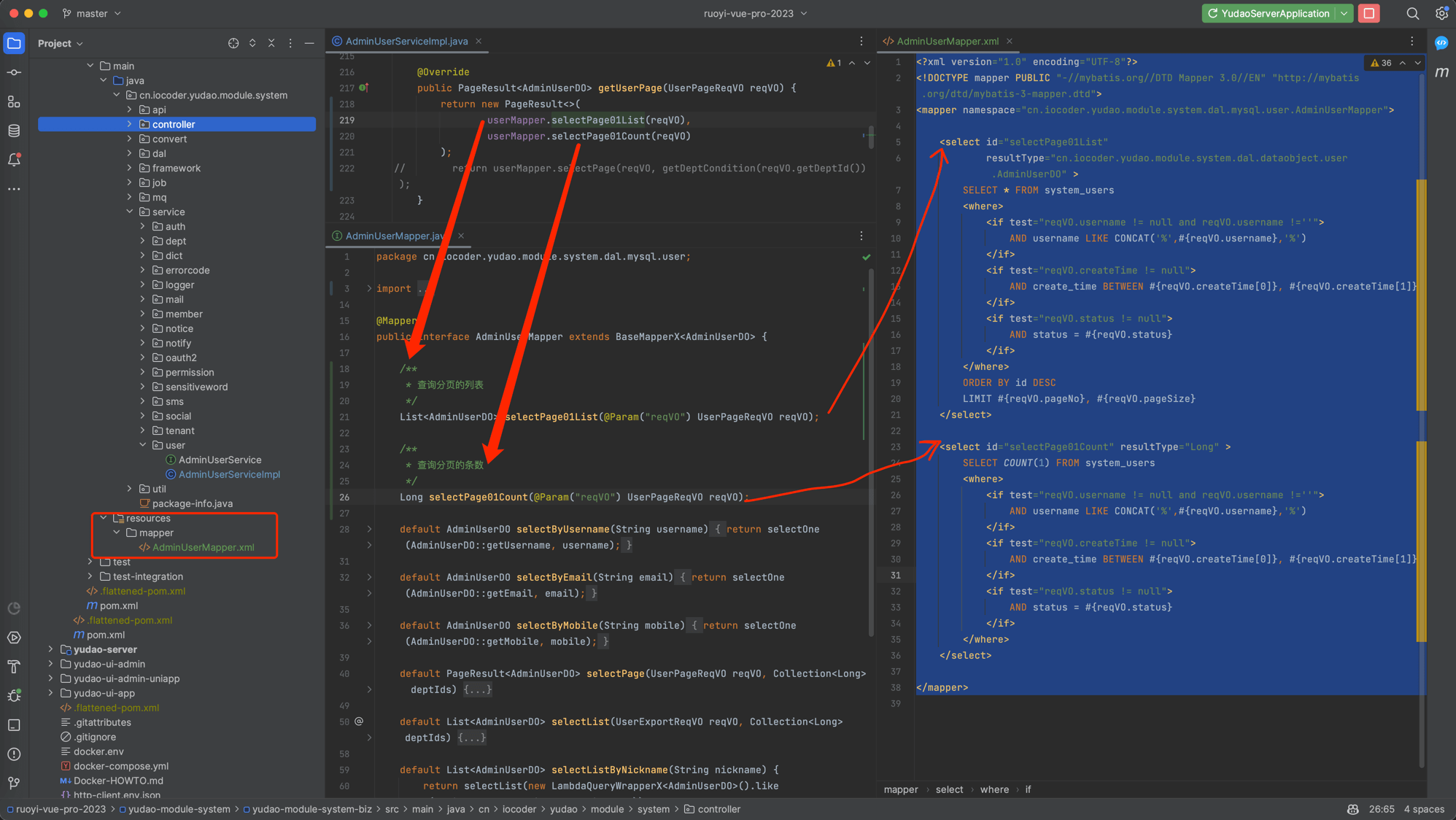 ① 创建
① 创建 AdminUserMapper.xml 文件,编写两个 SQL 查询语句:
    <?xml version="1.0" encoding="UTF-8"?>
    <!DOCTYPE mapper PUBLIC "-//mybatis.org//DTD Mapper 3.0//EN" "http://mybatis.org/dtd/mybatis-3-mapper.dtd">
    <mapper namespace="cn.iocoder.yudao.module.system.dal.mysql.user.AdminUserMapper">

    <select id="selectPage01List"
    resultType="cn.iocoder.yudao.module.system.dal.dataobject.user.AdminUserDO" >
    SELECT * FROM system_users
    <where>
    <if test="reqVO.username != null and reqVO.username !=''">
    AND username LIKE CONCAT('%',#{reqVO.username},'%')
    </if>
    <if test="reqVO.createTime != null">
    AND create_time BETWEEN #{reqVO.createTime[0]}, #{reqVO.createTime[1]},
    </if>
    <if test="reqVO.status != null">
    AND status = #{reqVO.status}
    </if>
    </where>
    ORDER BY id DESC
    LIMIT #{reqVO.pageNo}, #{reqVO.pageSize}
    </select>

    <select id="selectPage01Count" resultType="Long" >
    SELECT COUNT(1) FROM system_users
    <where>
    <if test="reqVO.username != null and reqVO.username !=''">
    AND username LIKE CONCAT('%',#{reqVO.username},'%')
    </if>
    <if test="reqVO.createTime != null">
    AND create_time BETWEEN #{reqVO.createTime[0]}, #{reqVO.createTime[1]},
    </if>
    <if test="reqVO.status != null">
    AND status = #{reqVO.status}
    </if>
    </where>
    </select>

    </mapper>
2
3
4
5
6
7
8
9
10
11
12
13
14
15
16
17
18
19
20
21
22
23
24
25
26
27
28
29
30
31
32
33
34
35
36
37
38
② 在 AdminUserMapper 创建这两 SQL 对应的方法:
    @Mapper
public interface AdminUserMapper extends BaseMapperX<AdminUserDO> {

    /**
     * 查询分页的列表
     */
    List<AdminUserDO> selectPage01List(@Param("reqVO") UserPageReqVO reqVO);

    /**
     * 查询分页的条数
     */
    Long selectPage01Count(@Param("reqVO") UserPageReqVO reqVO);
}
2
3
4
5
6
7
8
9
10
11
12
13
其中 UserPageReqVO.java (opens new window) 是分页查询的请求 VO。
③ 在 AdminUserServiceImplService 层,调用这两个方法,实现分页查询:
    @Service
@Slf4j
public class AdminUserServiceImpl implements AdminUserService {

    @Override
    public PageResult<AdminUserDO> getUserPage(UserPageReqVO reqVO) {
        return new PageResult<>(
                userMapper.selectPage01List(reqVO),
                userMapper.selectPage01Count(reqVO)
        );
    }
}
2
3
4
5
6
7
8
9
10
11
12
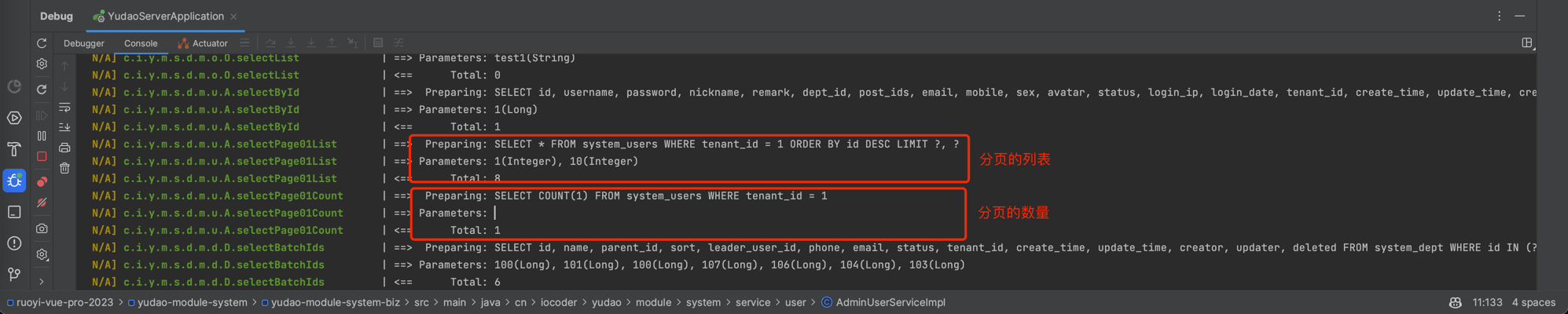
④ 简单调用下,可以在 IDEA 控制台看到 2 条 SQL:
# 1.2 方案二:MyBatis Plus XML
这个是 MyBatis Plus 拓展的使用方式,可以简化只需要写一条 SQL,步骤如下:
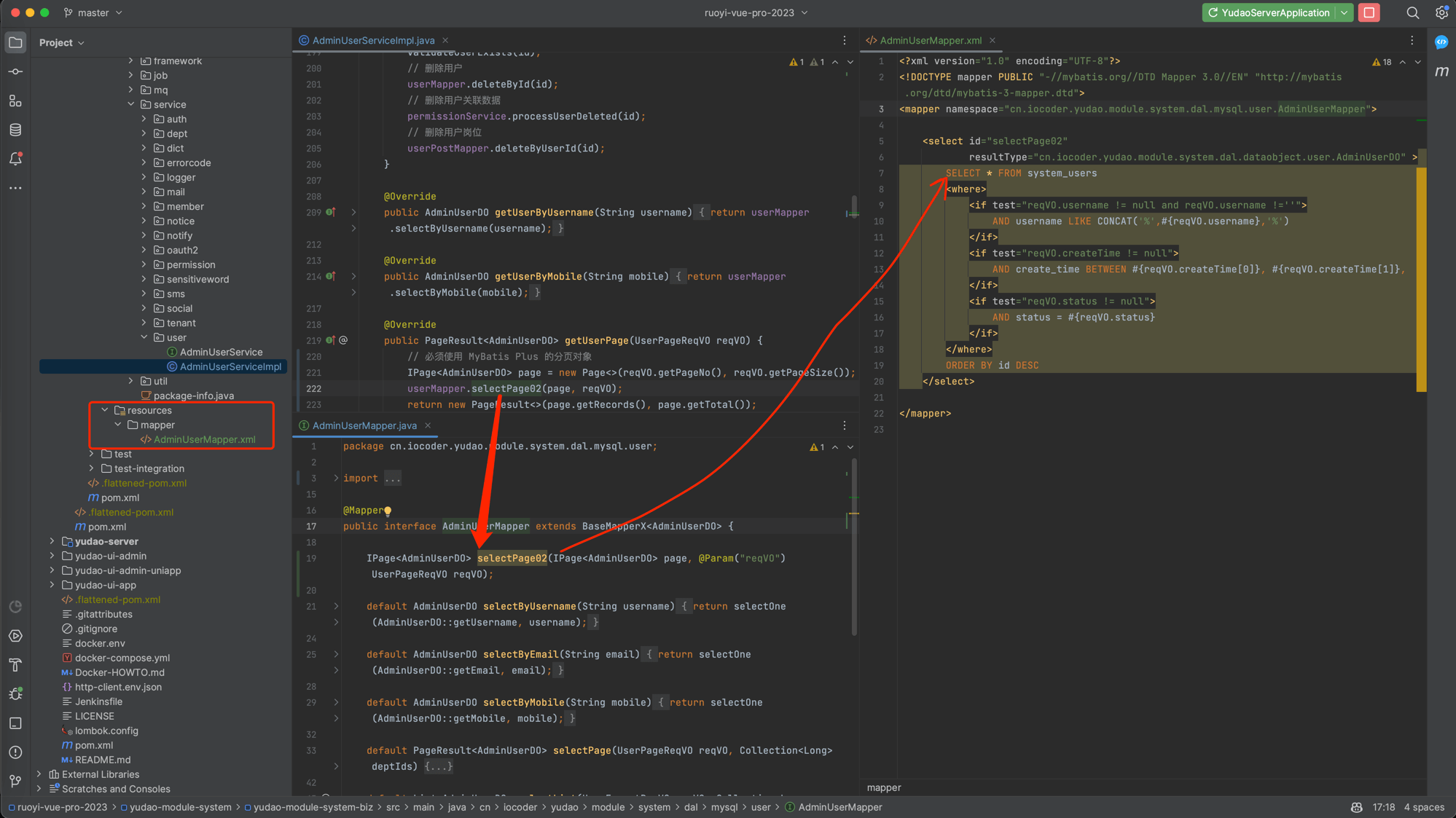 ① 创建
① 创建 AdminUserMapper.xml 文件,只编写一个 SQL 查询语句:
    <?xml version="1.0" encoding="UTF-8"?>
    <!DOCTYPE mapper PUBLIC "-//mybatis.org//DTD Mapper 3.0//EN" "http://mybatis.org/dtd/mybatis-3-mapper.dtd">
    <mapper namespace="cn.iocoder.yudao.module.system.dal.mysql.user.AdminUserMapper">

    <select id="selectPage02"
    resultType="cn.iocoder.yudao.module.system.dal.dataobject.user.AdminUserDO" >
    SELECT * FROM system_users
    <where>
    <if test="reqVO.username != null and reqVO.username !=''">
    AND username LIKE CONCAT('%',#{reqVO.username},'%')
    </if>
    <if test="reqVO.createTime != null">
    AND create_time BETWEEN #{reqVO.createTime[0]}, #{reqVO.createTime[1]},
    </if>
    <if test="reqVO.status != null">
    AND status = #{reqVO.status}
    </if>
    </where>
    ORDER BY id DESC
    </select>

    </mapper>
2
3
4
5
6
7
8
9
10
11
12
13
14
15
16
17
18
19
20
21
22
注意,不需要写 LIMIT 分页语句噢。
② 在 AdminUserMapper 创建这一 SQL 对应的方法:
    @Mapper
public interface AdminUserMapper extends BaseMapperX<AdminUserDO> {

    IPage<AdminUserDO> selectPage02(IPage<AdminUserDO> page, @Param("reqVO") UserPageReqVO reqVO);

}
2
3
4
5
6
第一个参数、返回结果必须都是 IPage 类型,第二个参数可以放查询条件。
③ 在 AdminUserServiceImplService 层,调用这一个方法,实现分页查询:
    @Service
@Slf4j
public class AdminUserServiceImpl implements AdminUserService {

    @Override
    public PageResult<AdminUserDO> getUserPage(UserPageReqVO reqVO) {
        // 必须使用 MyBatis Plus 的分页对象
        IPage<AdminUserDO> page = new Page<>(reqVO.getPageNo(), reqVO.getPageSize());
        userMapper.selectPage02(page, reqVO);
        return new PageResult<>(page.getRecords(), page.getTotal());
    }
}
2
3
4
5
6
7
8
9
10
11
12
因为项目使用 PageParam 和 PageResult 作为分页对象,所以需要和 IPage 做下转换。
④ 简单调用下,可以在 IDEA 控制台看到 2 条 SQL:
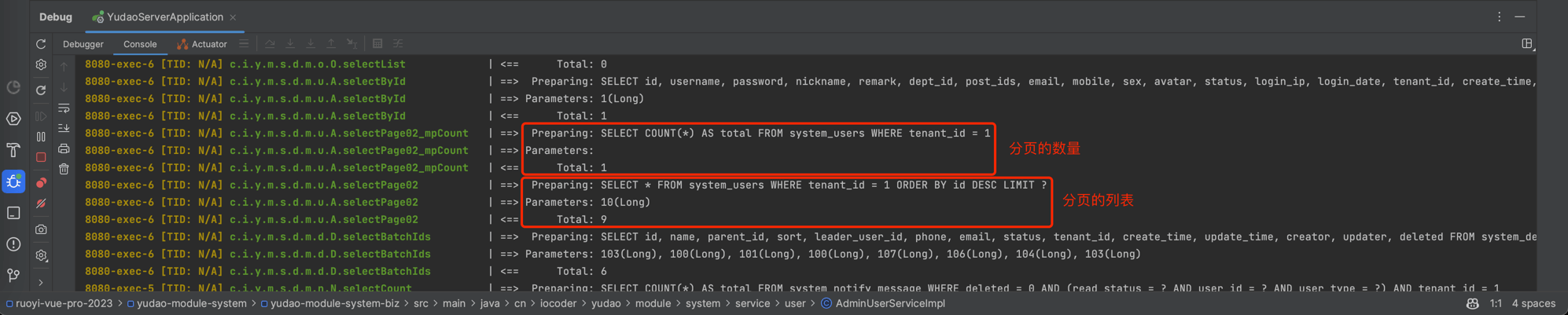 本质上,MyBatis Plus 是基于我们在 XML 编写的这条 SQL,计算出获得分页数量的 SQL。
一般情况下,建议采用方案二:MyBatis Plus XML,因为它开发效率更高,并且在分页数量为 0 时,就不多余查询分页的列表,一定程度上可以提升性能。
# 2. 联表查询
对于需要链表查询的场景,建议也是写 MyBatis XML,使用方法比较简单,
可以看下 《MyBatis学习总结(三)—— 多表关联查询与动态 SQL》 (opens new window) 文章。
除了 XML 这种方式外,项目也集成了 MyBatis Plus Join (opens new window) 框架,通过 Java 代码实现联表查询。
这里,以查询 system_users 和 system_dept 联表,查询用户状态为开启的用户列表。
# 2.1 案例一:字段平铺
① 创建 AdminUserDetailDO 类,继承 AdminUserDO 类,并添加 deptName 平铺。代码如下:
    @Data
public class AdminUserDetailDO extends AdminUserDO {

    private String deptName;

}
2
3
4
5
6
② 在 AdminUserMapper 创建 selectListByStatusAndDeptName 方法,代码如下:
    @Mapper
public interface AdminUserMapper extends BaseMapperX<AdminUserDO> {

    default List<AdminUserDetailDO> selectList2ByStatusAndDeptName(Integer status, String deptName) {
        return selectJoinList(AdminUserDetailDO.class, new MPJLambdaWrapper<AdminUserDO>() // 查询 List
                .selectAll(AdminUserDO.class) // 查询 system_users 表的 all 所有字段
                .selectAs(DeptDO::getName, AdminUserDetailDO::getDeptName) // 查询 system_dept 表的 name 字段,使用 deptName 字段“部分”返回
                .eq(AdminUserDO::getStatus, status) // WHERE system_users.status = ? 【部门名为 `芋道源码`】
                .leftJoin(DeptDO.class, DeptDO::getId, AdminUserDO::getDeptId) // 联表 WHERE system_users.dept_id = system_dept.id
                .eq(DeptDO::getName, deptName) // WHERE system_dept.name = ? 【用户状态为开启】
        );
    }

}
2
3
4
5
6
7
8
9
10
11
12
13
14
# 2.2 案例二:字段内嵌
① 创建 AdminUserDetailDO 类,继承 AdminUserDO 类,并添加 dept 部门。代码如下:
    @Data
public class AdminUserDetail2DO extends AdminUserDO {

    private DeptDO dept;

}
2
3
4
5
6
② 在 AdminUserMapper 创建 selectListByStatusAndDeptName 方法,代码如下:
    @Mapper
public interface AdminUserMapper extends BaseMapperX<AdminUserDO> {

    default List<AdminUserDetail2DO> selectListByStatusAndDeptName(Integer status, String deptName) {
        return selectJoinList(AdminUserDetail2DO.class, new MPJLambdaWrapper<AdminUserDO>()
                .selectAll(AdminUserDO.class)
                .selectAssociation(DeptDO.class, AdminUserDetail2DO::getDept) // 重点差异点:查询 system_dept 表的 name 字段,使用 dept 字段“整个”返回
                .eq(AdminUserDO::getStatus, status)
                .leftJoin(DeptDO.class, DeptDO::getId, AdminUserDO::getDeptId)
                .eq(DeptDO::getName, deptName)
        );
    }

}
2
3
4
5
6
7
8
9
10
11
12
13
14
# 2.3 总结
MyBatis Plus Join 相比 MyBatis XML 来说,一开始肯定是需要多看看它的文档 (opens new window) 。
但是熟悉后,我还是更喜欢使用 MyBatis Plus Join 哈~